Scroll through Instagram or Pinterest right now and you will find them everywhere — photos that look like they are mid-motion, with cinematic light, dramatic depth, and that unmistakable filmic quality. Most of them were created using ChatGPT motion prompts paired with AI image tools.
You do not need Photoshop skills. You do not need a DSLR. What you need is the right prompt, written in the right way. This article gives you that — real, copy-paste-ready prompts tested across ChatGPT and Gemini, plus a clear breakdown of what makes them work.
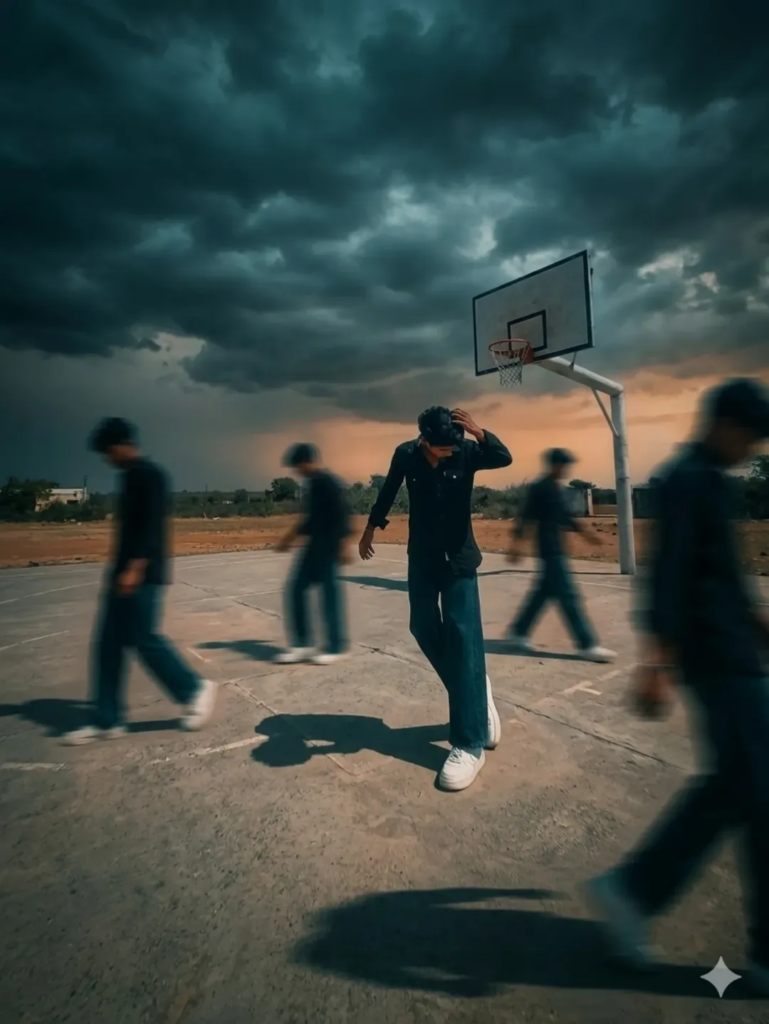
Use the uploaded image as the main subject, keep face and identity 100% same.Change background to an outdoor basketball court with dark moody clouds and dramatic sky.Add multiple clones of the same person walking around on both sides with strong motion blur effect.Keep main subject sharp and in focus, natural confident pose.Apply cinematic lighting with high contrast, shadows, and teal-orange color grading.Add depth of field, realistic shadows on ground.Style like fashion editorial photography, Nike campaign look.Ultra-realistic, 8K quality.What Are ChatGPT Motion Prompts for Photo Editing?
A motion prompt is a text instruction you give to an AI tool that tells it to simulate movement, speed, or cinematic energy in a still image.
Think of it like giving directions to a film director. Instead of saying “make it look good,” you say “add motion blur to the subject’s hair, shoot from a low angle, apply a teal-orange grade, soft bokeh in the background.”
The more specific your prompt, the more cinematic your result. Vague prompts produce generic output. Detailed prompts produce work that looks professionally edited.
These prompts work inside tools like ChatGPT with DALL-E 3, Adobe Firefly, Bing Image Creator, and Google Gemini with ImageFX integration.
Best ChatGPT Motion Prompts for Cinematic Effects
Portrait Motion Prompts
Use these when editing photos of people — solo portraits, street photography, or fashion shots.
Prompt 1 — Speed Blur Portrait: “Cinematic portrait of a young woman walking through a busy street, motion blur on the background, subject sharp and in focus, golden hour lighting, teal and orange color grade, 35mm film texture, shallow depth of field”
Prompt 2 — Wind Motion Effect: “Close-up portrait with hair flying in strong wind, dramatic stormy sky, cinematic color grade, lens flare from side, low shutter speed feel, hyper-realistic”
Prompt 3 — Freeze Frame Action: “A man mid-jump in urban setting, clothes and jacket caught mid-motion, frozen in air, gritty cinematic look, harsh shadows, 24mm wide shot”
Landscape and Nature Motion Prompts
Prompt 4 — Long Exposure Water: “Cinematic long exposure photo of a waterfall in dense forest, silky smooth water motion, morning fog, deep greens, 4K detail, shot on Sony A7 III”
Prompt 5 — Light Trail Cityscape: “Night cityscape with long exposure light trails from cars, bokeh city lights, deep blue sky, cinematic anamorphic lens flare, ultra wide angle”
Trending Cinematic Gemini Prompts You Should Try
Google Gemini handles motion prompts differently from ChatGPT. Gemini responds better to scene-based descriptions rather than camera-spec language.
Top Trending Gemini Prompts Right Now
Dramatic Sky Overlay: “Realistic photo edit: replace the sky with a stormy cinematic sky, keep the foreground subject perfectly sharp, natural light matching, no compositing artifacts”
Neon Motion Blur: “Subject walking through a neon-lit city at night, motion blur on background neon lights, subject crisp, cyberpunk aesthetic, rain-wet streets reflecting light”
Cinematic Gemini prompts work best when you describe the mood first, then the technical look. Start with “dramatic and emotional” or “high-contrast and gritty” before adding camera details.
Portrait vs. Scene Prompts — Which Works Better?
For Gemini — scene-based prompts win. For ChatGPT — camera-spec prompts win.
If you write “cinematic 28mm f/1.8 shallow depth portrait” in ChatGPT, you get precise output. The same prompt in Gemini may produce a flatter result. In Gemini, try “moody close-up portrait, soft background blur, warm sunset light, film grain” instead.
How to Write Better ChatGPT Motion Prompts
Most people write prompts that are either too short or too vague. Here is the exact structure that produces consistently strong cinematic results.
The 5-Part Prompt Formula
Every strong ChatGPT motion prompt follows this pattern:
- Subject — Who or what is in the frame
- Action or Motion — What movement is happening
- Lighting — Golden hour, harsh midday, neon, overcast
- Color Grade — Teal-orange, desaturated, warm vintage, cool blue
- Camera Style — 35mm film, anamorphic lens, wide angle, telephoto
Example using all five parts: “A motorcyclist speeding through a rain-soaked highway at night [subject + motion], headlights creating streaks behind them [motion], blue and white neon signs reflecting off the wet road [lighting], desaturated blue cinematic grade [color grade], wide angle GoPro-style shot with motion blur [camera style]”
Adding Emotional Tone to Motion Prompts
Camera specs create the look. Emotional tone creates the feel. Add one emotional word to any prompt and the output shifts noticeably.
Words that work: tense, lonely, euphoric, quiet, raw, nostalgic, electric.
Common Mistakes That Ruin Your Results
Using Too Many Instructions at Once
Packing 15 different effects into one prompt confuses the model. Pick three to four strong descriptors and let the AI fill the rest. More is not better here.
Forgetting to Specify the Subject’s State
If you want the subject sharp while the background blurs, say it explicitly. AI tools do not assume. Write “subject in sharp focus, background in motion blur” — not just “motion blur photo.”
Ignoring Aspect Ratio and Composition
Aspect ratio changes the cinematic feel entirely. Add “16:9 widescreen cinematic crop” or “2.39:1 anamorphic aspect ratio” to your prompt. This alone makes outputs look more like film and less like a phone photo.
FAQ
What are ChatGPT motion prompts used for?
They are text instructions that tell AI image tools to simulate movement, speed, or cinematic depth in a generated or edited photo. They are widely used for Instagram content, thumbnail creation, and AI photo editing workflows.
How are ChatGPT trending motion prompts different from regular prompts?
Trending motion prompts focus on viral visual styles — speed blur, cinematic sky overlays, neon light trails — that are currently popular on social media. Regular prompts are more generic and do not target a specific visual trend.
Can I use these prompts in Gemini too?
Yes. Most prompts work in both tools with minor adjustments. Gemini responds better to mood-first language, while ChatGPT performs well with camera-spec language. Small rewrites make a big difference.
Which AI tool gives the best cinematic photo results?
ChatGPT with DALL-E 3 is strong for realistic textures and lighting. Adobe Firefly is better for editing existing photos. Gemini with ImageFX works well for dramatic sky and environmental effects. Each tool has a specific strength.
Does prompt length affect the output quality?
Yes, but only up to a point. Prompts between 40 and 80 words consistently produce the best results. Shorter prompts lack detail. Longer prompts often produce conflicting outputs where the AI cannot prioritize correctly.
How do I make my motion prompts feel more realistic?
Add a specific camera model, lens focal length, and film stock reference. Writing “shot on Sony FX3, 24mm lens, Kodak Vision3 500T color grade” tells the AI to emulate real-world photographic properties rather than generating a generic stylized look.
Why does my prompt give different results each time?
AI image models are non-deterministic — they generate a new variation each run. If you find a result you like, save the exact prompt and note any seed numbers the tool provides. That is the only way to get close to repeating it.
Is there a way to combine ChatGPT motion prompts with real photos?
Yes. Tools like Adobe Firefly, Canva AI, and Bing Image Creator allow you to upload a reference image and apply a text prompt on top of it. This is called img2img or style transfer, and it gives you more control over the final output.
Final Thoughts
The difference between a forgettable AI photo and a cinematic one comes down to how precisely you write your ChatGPT motion prompts. Structure your prompt with a clear subject, defined motion, intentional lighting, and a color grade — and your results will be consistently stronger than what most people produce.
Pick two or three prompts from this article, test them today, and start building your own library of variations that work for your content style.