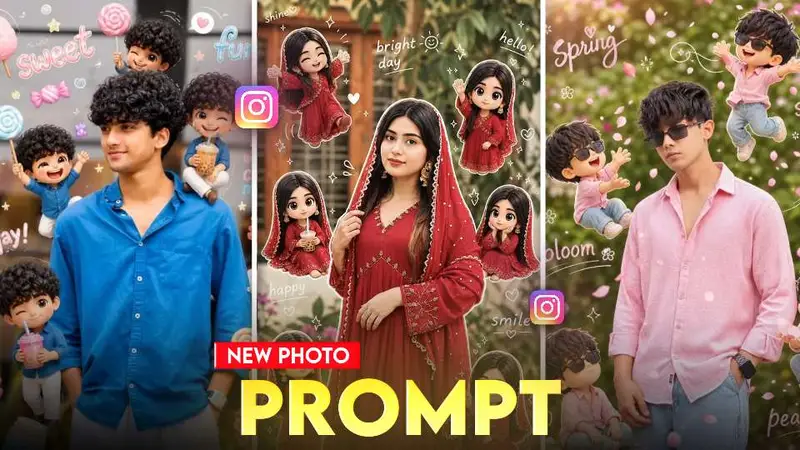
Your photo just became a cartoon — and not the generic kind. Chibi Cartoon AI Viral Photo Prompts are turning ordinary selfies into big-eyed, oversized-head anime-style characters that look like they belong in a Japanese game cutscene.
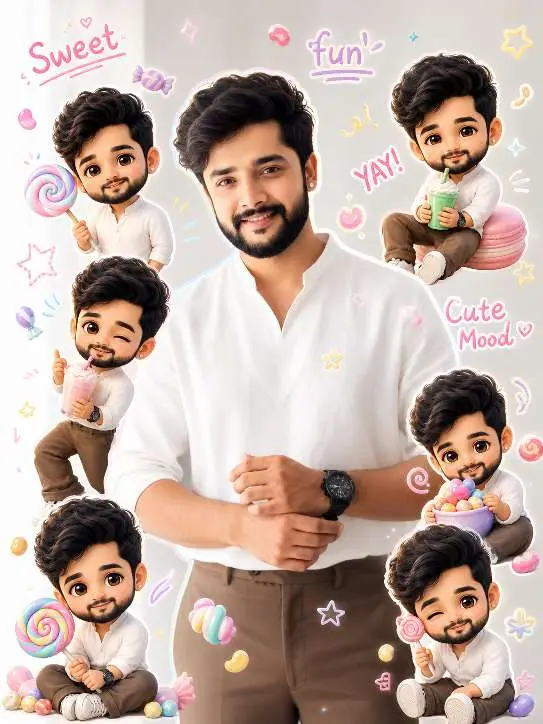
Use a real face as reference. Same background. Bright soft lighting with candy-color highlights. Surround with mini 3D chibi versions holding lollipops, candies, drinks, making playful expressions. Add doodles like candy shapes, stars, swirls, cute icons. Include handwritten text like “sweet,” “fun,” “yay,” “cute mood.” Style: vibrant pastel palette, glossy chibi texture, playful Korean Instagram vibe, clean layout, 4:5 ratio.This style is blowing up across Instagram Reels right now. Creators using MK Edit with the right prompt structure are seeing their cartoon edits shared thousands of times. The look is cute, unique, and instantly recognizable — which is exactly why it stops the scroll.
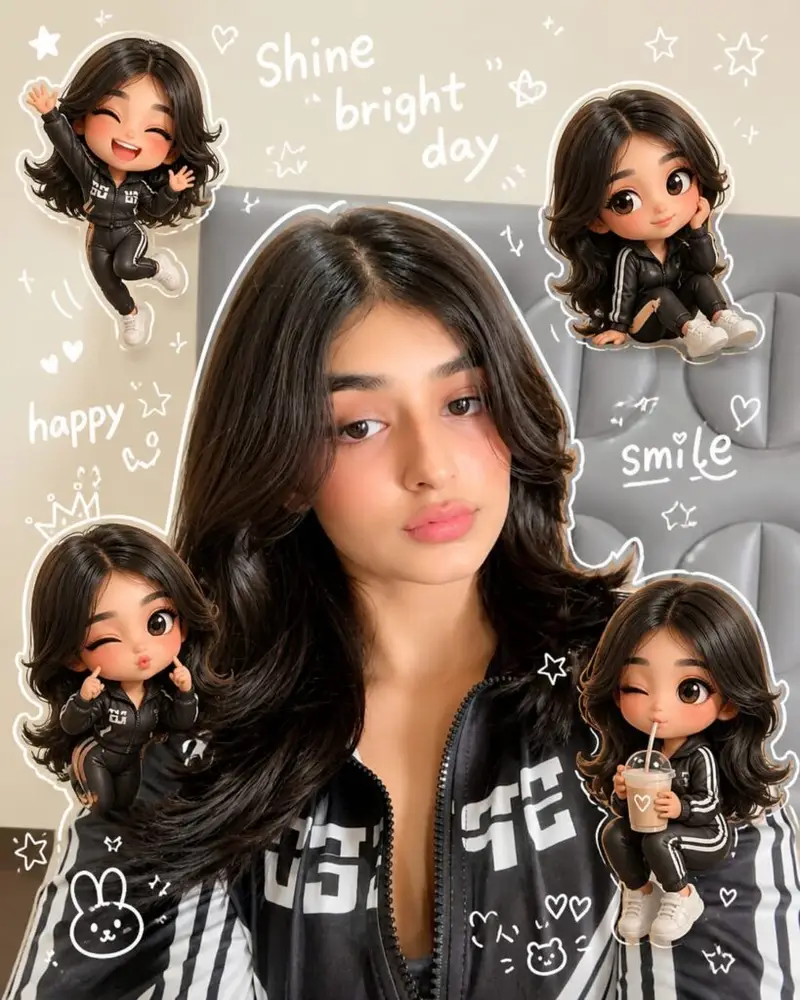
Use a real face as a reference photo The background is the same as in the photo. The lighting is warm, soft, and clean, with subtle shadows. Around the image add several mini chibi (3D cute style) version of the Character, While maintaining the original facial features. Expressions: jumping cheerfully waving sitting relaxed holding a drink cute and playful expressions Add hand-drawn white doodle elements: outline around the main body stars, hearts, sparkless motion lines small cute icons Add aesthetic handwriting such as: "shine," "bright " day, "happy, smile, ect. (Casual doodle font) overall style: clean & aesthetic composition white sticker outline soft pastel colour tone high detall 3D chibi glossy look cute korean style instagrammable. 4:5Read : MK Edit Devil Style Prompt | ChatGPT Photo Editing Prompts
This guide gives you ready-to-use prompts, the exact MK Edit workflow, and tips to make your Chibi edit look polished and not like a cheap filter.
What Is the Chibi Cartoon AI Style?
Chibi is a Japanese art term meaning “small” or “short.” In cartoon culture, it refers to characters drawn with exaggerated proportions — a very large head, small body, big round eyes, and simplified features that look adorable rather than realistic.
Chibi Cartoon AI editing applies this same aesthetic to real photos using AI image generation. The result is a cartoon version of you that keeps your likeness but transforms it into a soft, anime-influenced illustration style.
Why Chibi Works So Well for AI Edits
The style is forgiving. Unlike hyper-realistic AI edits that struggle with facial accuracy, Chibi’s exaggerated proportions actually benefit from AI generation. The model doesn’t need to perfectly replicate your face — it just needs to capture your vibe in cartoon form.
It also works across ages and genders. Kids, teens, adults — everyone looks good in Chibi style. That broad appeal is part of why these edits spread so quickly on social platforms.
Best Chibi Cartoon AI Viral Photo Prompts for MK Edit
These prompts are structured for MK Edit’s AI engine. Paste them exactly as written for best results.
Prompt 1 — Classic Chibi Portrait
“Chibi cartoon style portrait of a young person. Big round sparkling eyes. Large head, small cute body. Soft pastel background with floating stars. Anime illustration style. High detail. Warm colors. Studio lighting effect.”
Prompt 2 — Chibi School Style
“Chibi cartoon character in a school uniform. Big expressive eyes with light reflection. Oversized head. Pink and blue soft gradient background. Anime art style. Cute smile. Clean line art. High resolution illustration.”
Prompt 3 — Chibi Fantasy Character
“Chibi anime character wearing a fantasy costume with a small cape. Big golden eyes. Tiny body with detailed clothing. Magical sparkles around the character. Purple and teal background. Studio Ghibli-inspired style. 4K digital illustration.”
Prompt 4 — Chibi Street Style (Trending)
“Chibi cartoon boy in a streetwear outfit — hoodie, sneakers, cap. Big black eyes with white highlights. Urban cartoon background with graffiti wall. Bold colors. Modern anime illustration. High detail. 4K quality.”
Prompt 5 — Chibi Couple Style
“Two chibi cartoon characters standing together. Matching outfits. Big expressive eyes. Soft pink bokeh background. Holding hands. Cute romantic anime illustration style. Pastel colors. High detail. Clean digital art.”
Use your photo as the base input and apply one of these prompts on top through MK Edit’s AI style feature.
How to Use Chibi Cartoon Prompts in MK Edit
The process is simple but the order matters.
Step 1 — Open MK Edit on your phone. Go to the AI Photo section from the main menu.
Step 2 — Upload your photo. Front-facing, clear photos work best. Good lighting on the face dramatically improves cartoon output quality.
Step 3 — Paste your chosen prompt into the text field. Do not shorten or paraphrase — every keyword in the prompt instructs the AI on a specific visual element.
Step 4 — Set generation strength between 65% and 80%. This range preserves enough of your photo’s likeness while allowing the cartoon transformation to take effect fully.
Step 5 — Generate and compare. Run the same prompt two to three times. Chibi Cartoon AI Viral Photo Prompt results vary per generation, so picking the best from three attempts gives a noticeably better final image.
Save the output to your gallery and export at the highest available resolution before posting.
Chibi Cartoon Style vs Other Viral Cartoon Edits
| Style | Look | Difficulty | Reel Performance |
|---|---|---|---|
| Chibi Cartoon | Cute, big eyes, anime | Easy | Very High |
| Pixar 3D Style | Realistic 3D cartoon | Medium | Very High |
| Sketch Art Style | Pencil drawing look | Easy | Medium |
| Watercolor Style | Soft painted look | Easy | Medium |
| Devil Dark Style | Fire, dark dramatic | Easy | High |
Chibi and Pixar 3D are currently the two top-performing cartoon styles on Instagram Reels. Chibi has an edge in shareability because of its universal “cute” appeal — people tag friends, which multiplies reach organically.
Sketch and watercolor styles look good but generate less engagement because they feel more static and less personality-driven.
Why These Prompts Go Viral on Instagram
Three things make Chibi edits perform well on Reels.
First, the style is immediately recognizable. Viewers know what they’re looking at in under two seconds, and recognition drives saves and shares faster than novelty does.
Second, MK Edit Chibi photo prompts produce results that look custom-made, not like a preset filter. That perceived effort makes the content feel more valuable to the audience.
Third, the format pairs well with trending audio. Slow reveal transitions — showing the original photo and then cutting to the Chibi cartoon — work perfectly with popular Reel audio formats right now. That structure is consistently rewarded by Instagram’s algorithm with wider distribution.
Common Mistakes That Ruin Chibi Edits
Even with a solid prompt, these errors kill the output quality.
- Using a group photo as the base — AI gets confused with multiple faces. Always use a single-person photo
- Uploading a screenshot instead of the original photo — Compression from screenshots reduces detail significantly
- Setting generation strength above 85% — This erases face features and makes the cartoon unrecognizable as you
- Leaving out the art style keyword — Without “anime illustration style” or “digital art,” the output looks like a generic cartoon filter
- Cropping too tight — Give the AI some background space so it can construct the Chibi body and setting properly
Fix these before you generate and you’ll get a clean result on the first or second try.
FAQ
What is a Chibi Cartoon AI Viral Photo Prompt?
It’s a text instruction given to an AI image tool that tells it to convert a real photo into a Chibi-style cartoon character — with big eyes, large head, small body, and anime-inspired art style. The right prompt structure controls every visual element of the output.
How do I use Chibi Cartoon Prompts in MK Edit for free?
Open MK Edit, upload your photo, paste one of the prompts from this guide into the AI text field, set strength to 70–80%, and generate. MK Edit offers free daily generations without requiring a paid subscription.
Why does my Chibi edit not look anime style?
The most likely reason is missing style keywords in your prompt. Make sure your prompt includes phrases like “anime illustration style,” “big round eyes,” and “digital art.” Without these, the AI defaults to a generic cartoon look instead of proper Chibi style.
Which photo works best for Chibi cartoon editing?
A clear, front-facing photo taken in natural light with a simple background works best. Avoid sunglasses, heavy filters, or group shots. The cleaner the input photo, the more accurate and detailed the cartoon output.
Can I use these Chibi prompts in tools other than MK Edit?
Yes. These prompts work in any AI image tool that accepts text descriptions, including DALL·E 3 in ChatGPT, Adobe Firefly, and Bing Image Creator. MK Edit is recommended for beginners because of its simple mobile interface.
Is the Chibi Cartoon style still trending in 2025?
Yes. Chibi-style edits have been gaining traction through 2024 and remain one of the top-performing cartoon aesthetics on Instagram Reels and YouTube Shorts in 2025, especially when paired with trending audio.
What makes Chibi edits go viral compared to other cartoon styles?
Chibi’s combination of cuteness, recognizability, and anime appeal makes it highly shareable. People tag friends in Chibi edits more than they do with other cartoon styles, which triggers Instagram’s sharing signals and boosts organic reach.
Does skin tone affect Chibi cartoon output quality?
No. Chibi style works well across all skin tones because the art form simplifies and stylizes features rather than replicating them realistically. The prompt controls color tone — you can add “warm skin tones” or “cool pastel skin” to adjust the output.
Your Cartoon is One Prompt Away
Chibi Cartoon AI Viral Photo Prompts give you a fast, reliable way to create content that looks hand-crafted and trends easily on Instagram. The prompts in this guide are tested, structured, and ready to paste directly into MK Edit.
Pick one prompt, upload a clean photo, and run it today. Then post the before-and-after as a Reel — that format is currently getting strong reach for Chibi edits across Indian creator accounts.
Save this page and share it with your editing group so everyone can try it.