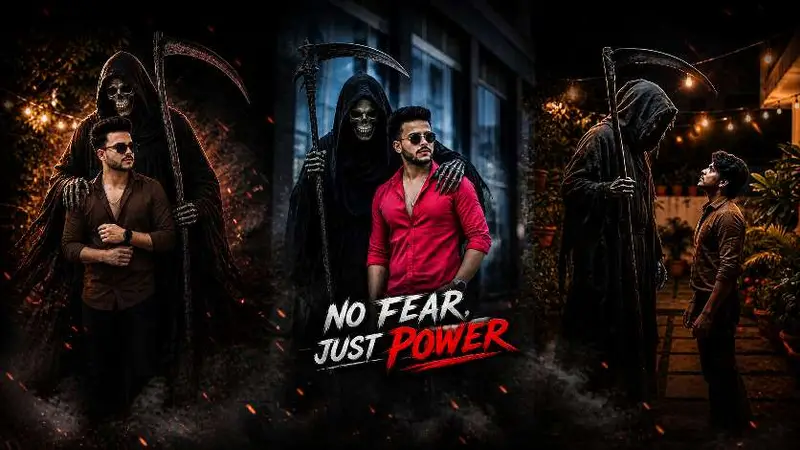
If you’ve seen those dark, fire-surrounded, glowing-eye photo edits flooding Instagram Reels lately — that’s the Devil Style trend. And the secret behind those edits? Devil Style Editing Prompts written specifically for AI tools like MK Edit.
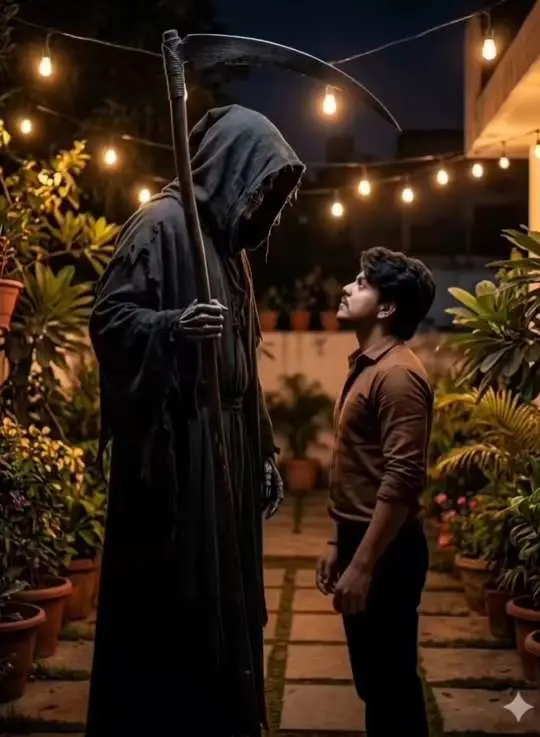
ADD THE HIM STANDS A DARK, EERIE GRIM REAPER WEARING A BLACK HOODED CLOAK, WITH A SKULL FACE AND HOLDING A LARGE SCYTHE. THE REAPER’S ARM IS PLACED CASUALLY AROUND THE MAN’S SHOULDERThese aren’t just cool-looking edits. They’re getting millions of views because the visual contrast — dark smoke, red fire, dramatic lighting — hits hard on mobile screens. Content creators who use the right prompt structure are getting 10x more reach on their reels compared to regular photo edits.
This guide gives you ready-to-use prompts, explains how to structure them, and shows exactly how to get results with MK Edit.
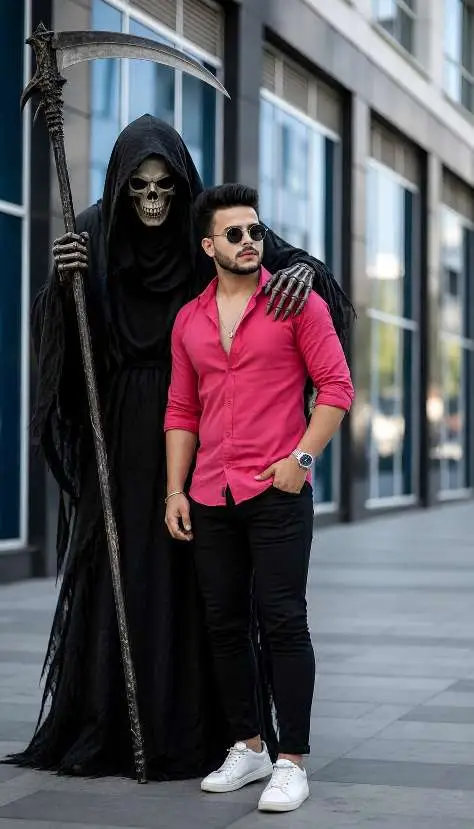
ADD THE HIM STANDS A DARK, EERIE GRIM REAPER WEARING A BLACK HOODED CLOAK, WITH A SKULL FACE AND HOLDING A LARGE SCYTHE. THE REAPER’S ARM IS PLACED CASUALLY AROUND THE MAN’S SHOULDERWhat Are Devil Style Editing Prompts?
Devil Style Editing Prompts are text instructions given to AI image generation tools to create a specific dark, dramatic aesthetic. The style usually includes:
- Deep black or smoky backgrounds
- Red, orange, or dark purple fire effects
- Glowing eyes (red or white)
- Cracked ground or ash particles
- Cinematic lighting with heavy shadows
These prompts work inside tools like MK Edit, which uses AI to process the description and apply the visual style to your uploaded photo.
Why This Style Is Trending Right Now
Instagram’s algorithm favors high-contrast, visually striking content. Devil Style edits score high on that front — they look premium, they’re unusual, and they stop the scroll. Telegram AI prompt communities are seeing thousands of downloads weekly for these templates.
The style also pairs well with trending audio on Reels, especially dark BGM and slow-motion tracks.
Best Devil Style Editing Prompts for MK Edit
Below are tested prompts. Paste these directly into MK Edit or any AI image tool that accepts text prompts.
Prompt 1 — Classic Devil Fire Style
“A young man standing in front of a massive wall of dark red fire. Smoky black background. Eyes glowing bright red. Embers floating in the air. Dramatic cinematic lighting. Ultra realistic. 4K quality. Dark fantasy style.”
Prompt 2 — Devil King Throne Style
“A powerful figure sitting on a throne made of black stone and bones. Surrounded by dark purple and orange fire. Crown with horns. Red glowing eyes. Ash falling from above. Dark sky background. Hyper-realistic. Cinematic mood.”
Prompt 3 — Minimalist Devil Glow Style
“Close-up portrait of a person with red glowing eyes. Smoke rising around the face. Dark black background. One ray of red light from above. Skin details sharp and realistic. Dramatic shadow on one side of the face. 4K portrait.”
Prompt 4 — Devil Street Style (Urban Trending)
“A young man in a black hoodie standing on a cracked dark street. Fire rising from cracks in the ground. Red and black sky. Sparks flying. Attitude pose. Cinematic 4K photo. High contrast. Dark color grade.”
Use your own photo as the base and let MK Edit apply the style on top using these prompts.
How to Use These Prompts Step by Step
Getting the result right the first time saves effort. Here’s the exact workflow:
Step 1 — Open MK Edit and select the AI Photo Editing option from the home screen.
Step 2 — Upload your photo. Use a clear, front-facing photo with decent lighting. Blurry inputs give blurry outputs.
Step 3 — Paste the prompt in the text box exactly as written. Don’t paraphrase — specific words like “cinematic lighting” and “4K quality” affect the output quality.
Step 4 — Adjust strength slider to 70–85%. Full 100% often removes your face features. Keep it slightly lower for a balanced result.
Step 5 — Generate and save. If the first result doesn’t match expectations, run it again — AI outputs vary each time.
Most creators run three to five generations per prompt and pick the best one.
Devil Style vs Other Trending Edit Styles
| Style | Mood | Best Tool | Reel Performance |
|---|---|---|---|
| Devil Style | Dark, dramatic | MK Edit | Very High |
| Angel Style | Bright, soft | Bing Image Creator | High |
| Warrior Style | Epic, bold | Adobe Firefly | High |
| Neon Glow Style | Colorful, vibrant | CapCut AI | Medium |
Devil Style editing consistently outperforms other dark aesthetics because the fire + shadow combination is more visually dynamic on small screens.
Angel Style is growing too, but it requires better source photo quality to look good. Devil Style is more forgiving with input photos.
Common Mistakes to Avoid
Even good prompts fail if basic steps are skipped.
- Using a low-quality photo — AI can’t fix pixelated or over-filtered source images
- Copying prompts with typos — One wrong word changes the entire output style
- Setting strength too high — Above 90% usually distorts facial features
- Skipping the lighting keyword — Without “cinematic lighting” or “dramatic light,” results look flat
- Using wrong aspect ratio — Use 9:16 for Reels, not square crops
These mistakes are why many creators get poor results even with good prompts. Fix the input, and the output follows.
FAQ
What are Devil Style Editing Prompts used for?
They’re used to create dark, fire-themed AI photo edits for Instagram Reels, YouTube thumbnails, and Telegram content. The style is trending because of its high-contrast dramatic look that performs well on mobile screens.
How do I use Devil Style Prompts in MK Edit?
Open MK Edit, upload your photo, paste the prompt in the text input field, adjust the generation strength to around 70–80%, and generate. Run it two to three times for the best variation.
Can I use these prompts in ChatGPT or Gemini?
These specific prompts are designed for image generation tools, not text AI. For ChatGPT, use DALL·E 3 mode. For Gemini, use the image generation feature if available in your region. MK Edit is the easiest option with no cost.
Why does my Devil Style edit not look like the examples?
The most common reason is photo quality. Use a well-lit, clear front-facing photo. Also make sure the prompt is pasted exactly — even small changes like removing “cinematic lighting” affect the result significantly.
Is MK Edit free to use for these prompts?
Yes, MK Edit offers free AI generations with a daily limit. For bulk editing or higher resolution output, a paid plan is available. Most users get good results within the free tier.
Which Devil Style prompt is best for Instagram Reels?
Prompt 4 (Devil Street Style) tends to perform best on Reels because the urban setting and attitude pose connect with younger audiences. Prompt 1 is better for profile edits and thumbnail use.
Can girls also use Devil Style Editing Prompts?
Absolutely. Just adjust the prompt — replace “young man” with “a young woman” and keep everything else the same. The fire and smoke effects work equally well regardless of gender.
How often should I post Devil Style Reels?
Posting one to two times per week is enough to stay in the trend without oversaturating your audience. Pair each edit with trending dark BGM audio for better reach.
The Right Prompt Makes All the Difference
Devil Style Editing Prompts are only as powerful as the words you put into them. Vague prompts give vague results. Specific, structured prompts give professional-looking edits that rank on Explore and trend on Telegram.
Start with Prompt 1, test your photo, and iterate. Once you see the first clean output, you’ll understand exactly what works for your face and lighting.
Save this article, share it with your editor friends, and drop your reel link in the comments once you’ve made your edit.